
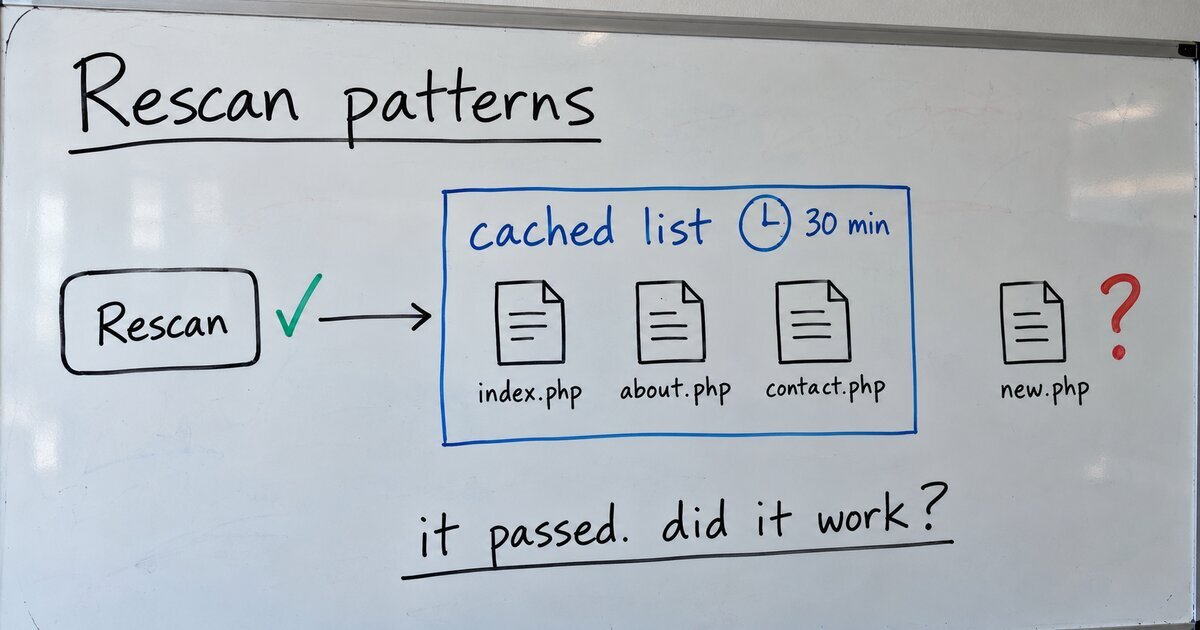
I added a new file to my theme’s patterns/ folder and clicked Rescan patterns. That is the headline tool in Blockwright Workbench, my plugin for block-theme development, and my coding assistant wrote it. The notice said “Theme patterns rescanned and re-registered.” The new pattern was not in the inserter.
About an hour earlier the AI had called the plugin ready to submit to WordPress.org. WordPress Coding Standards reported 0 errors and 0 warnings. Plugin Check passed in every category. The readme passed the official validator. Every one of those checks passed a tool that did nothing.
What the tool did
The original code removed the theme’s registered patterns and asked core to register them again:
$registry = \WP_Block_Patterns_Registry::get_instance();
foreach ( $registry->get_all_registered() as $pattern ) {
	// Unregister each pattern that belongs to this theme (name check omitted here).
	unregister_block_pattern( $name );
}

if ( function_exists( '_register_theme_block_patterns' ) ) {
	_register_theme_block_patterns();
}

wp_cache_flush();

return __( 'Theme patterns rescanned and re-registered.', 'blockwright-workbench' );
That reads like a rescan. It isn’t one, because of where core gets its list of pattern files.
Where core gets the list
Since WordPress 6.4, core does not read the patterns/ folder on every request. WP_Theme::get_block_patterns() reads the folder once, parses each file’s header, and caches the result. Weston Ruter’s 6.4 dev note introduced this to speed up page loads. Since 6.6 the cache is a site transient on every site, with or without a persistent object cache, as the developer reference records.
In class-wp-theme.php (WP 7.1.3), core uses the cached copy when all three of these hold:
- Theme development mode is off.
- A site transient named
wp_theme_files_patterns-plus a hash exists. - The theme version stored in that transient matches the
Versionheader in the theme’sstyle.css.
The hash is an md5 of the theme root path plus the theme’s folder name. The transient expires after 1800 seconds (30 minutes), unless a wp_theme_files_cache_ttl filter changes that.
So the tool unregistered every pattern, then registered them again from the cached list, which did not include the new file. Then it ran wp_cache_flush(). That flushes the object cache, but on a site without a persistent object cache a site transient is stored in the options table, so the flush does not reach it.
I tested this on WP 7.1.3 for this post: the transient survives wp_cache_flush() and is gone after delete_pattern_cache().
Left alone, the new pattern would have shown up within 30 minutes, when the transient expired. That is what makes this bug easy to miss. Click the button, come back after lunch, and the tool looks like it worked.
The fix, in two passes
The first pass called WP_Theme::delete_pattern_cache(), a public method since 6.4 that builds the transient’s key for you, before registering again. That worked.
Two days later the re-registration came out entirely. _register_theme_block_patterns() is marked @access private in block-patterns.php, so core can change it in any release. Plugin Check had passed that call too. It was also unnecessary. Core hooks that function to init, so it runs on every request, and the tool redirects when it finishes. The next request rebuilds the list from the folder.
The tool is now this:
foreach ( array_unique( array( get_stylesheet(), get_template() ) ) as $theme_slug ) {
	$theme = wp_get_theme( $theme_slug );

	if ( $theme->exists() ) {
		$theme->delete_pattern_cache();
	}
}

wp_cache_flush();
The loop covers a child theme and its parent, because core builds each theme’s hash from its own folder, so each one has its own cache. The notice now says what happened: the cache is cleared, and patterns are read from disk on the next page load.
What the checks missed
Every check run on the plugin reads code or loads it. None of them does the job the tool claims to do, so a function that runs without an error and changes nothing passes all of them. A passing check means the code is well formed, and nothing more.
If your new pattern doesn’t show up
Each of these makes core read the folder again. They come from the 6.4 dev note and the 7.1.3 source:
- While you develop: add
define( 'WP_DEVELOPMENT_MODE', 'theme' );towp-config.php. Core then skips the cache and deletes any cached copy. - When you deploy: raise the
Versioninstyle.css. The cached copy no longer matches, so core ignores it. - From WP-CLI: run
wp eval 'wp_get_theme()->delete_pattern_cache();'. For a child theme, run it for the parent as well, withwp_get_theme( get_template() ). - Or wait: the transient expires after 30 minutes by default.
wp cache flush alone does not clear it unless the site runs a persistent object cache. The Theme Handbook’s patterns page says you should see your pattern in the inserter once the file exists, and it does not mention the cache.
Clear the pattern cache, or bump the version
To make WordPress read a theme’s patterns/ folder again, call WP_Theme::delete_pattern_cache() for the active theme and its parent, or raise the Version in style.css.