
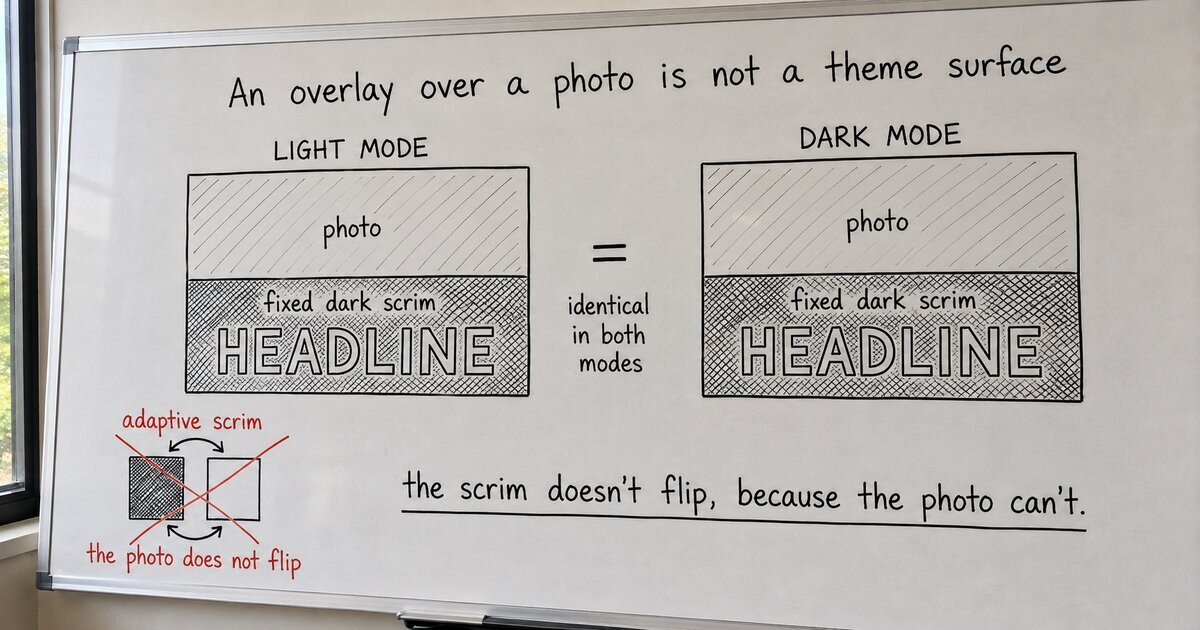
I inherited a broken hero and set out to build the most ordinary thing on the web: a photograph, a dark scrim to knock it back, white text on top. Every marketing site has one. In this theme it was the single thing I could not build, and the reason took me half an hour and three wrong turns to say out loud.
The theme’s best idea is the whole problem. Every color in it is adaptive, written with the CSS light-dark() function, which returns one value in light mode and another in dark, following each visitor’s operating system. There is no fixed white in the palette, and no fixed black. A surface that is near-white for a daytime visitor is near-black for a night one, on its own, which is exactly what you want for a page. So “white text on a dark scrim” hits a wall on the first word. There is no white to reach for. Every color I had flips out from under the visitor.
First wrong turn: I put the text on a solid surface card floating over the photo. That uses the adaptive tokens honestly, and it works, and it is ugly. Nobody covers their own hero photo with a panel to make the headline readable.
Second wrong turn, and this is the one I am slightly embarrassed by: an adaptive scrim. A darkening layer that flips with the OS like everything else, a dark veil in light mode and a lighter one in dark. I built toward it for a while before I said the sentence that kills it. A scrim over a photo is not adaptive, because the photo does not flip. A dark veil over a daytime street stays dark in both modes, because the street is a fixed thing that was there when the shutter closed. Asking the veil to respond to the visitor’s OS is asking it to respond to something the picture never had.
That sentence is the whole note. An image with an overlay is not a theme surface, so it must not follow the OS. The scrim and the text on it are fixed: one dark veil, one light label, the same in light mode and dark. It is the standard every other site uses without thinking about it, and I had walked past it for thirty minutes because I was being clever about adaptivity in the one place it did not belong.
WordPress agreed the moment I stopped arguing. The Cover block already lets you pin the overlay to a color you choose and opt out of its own guesswork, the routine where it averages the image’s brightness and picks your text color for you. Set a fixed overlay color, flag it as user-chosen, and the block stops guessing. I did that, with two new fixed tokens: a dark media-scrim and a light on-media for the text.
Then the theme bit me one last time, and this part is worth keeping. The two fixed colors vanished from the rendered palette. No error, just gone. The cause: this theme writes every color as light-dark(), and its plumbing expects that shape, so even a color that never changes has to be written in the adaptive grammar:
/* A fixed color, spelled the way an all-light-dark() theme demands: */
--media-scrim: light-dark( oklch(0.20 0 0), oklch(0.20 0 0) ); /* same value both slots */
Written as a bare oklch(), it dropped out of the round-trip. Written as light-dark() with identical slots, a fixed thing wearing the adaptive theme’s uniform, it stayed.
Here is the part that transfers, and it is not about scrims. Before you make a thing adaptive, ask what is underneath it. A page’s surface is genuinely the visitor’s to change, so it should follow their light or dark mode. A photograph is not: it was fixed the moment the shutter closed, and everything stacked directly on it, the scrim and the label both, is fixed with it. I lost half an hour reaching for the theme’s best tool without stopping to ask whether this surface was the kind of thing that tool is for. “Looks adaptive” and “is the right model for this surface” turn out to be different questions, and the whole afternoon came down to only ever asking the first one.