
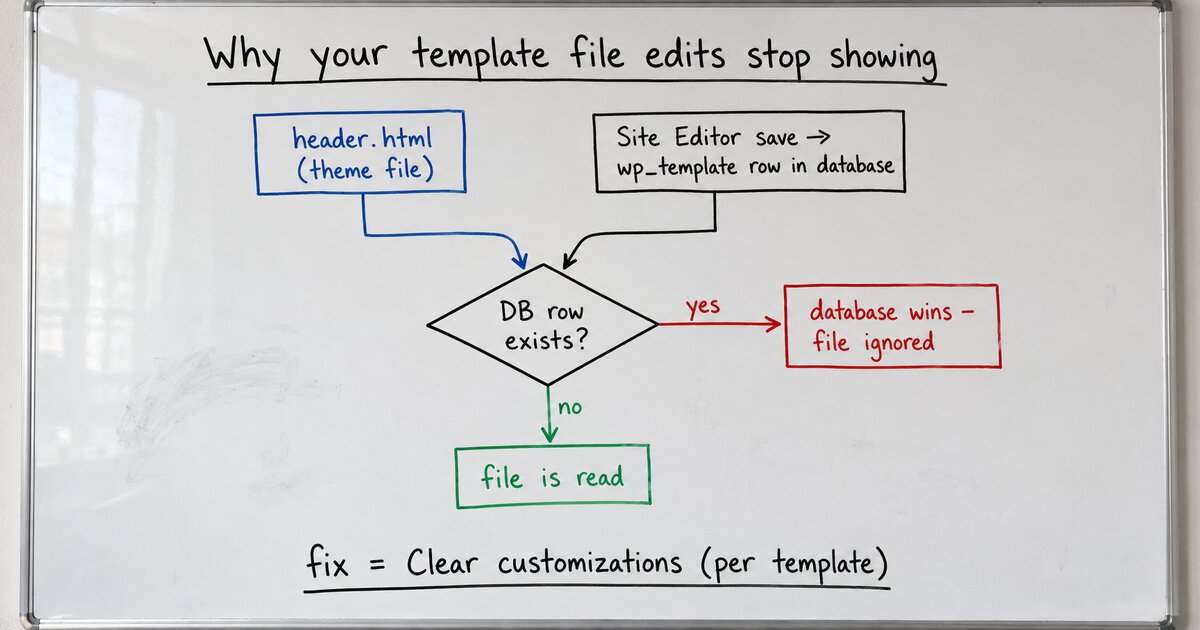
I was iterating on my block theme’s templates, editing the .html files on disk, reloading, editing again. At some point the reloads stopped doing anything. The file changed; the site didn’t. No error, no cache to clear, nothing in the logs. If you develop block themes long enough, this exact silence finds you.
Here’s what had happened: at some point I’d saved a template in the Site Editor. Just once was enough. That save doesn’t write to the theme; it creates a post of type wp_template in the database, tagged with the theme’s slug, holding a copy of the template’s markup. From that moment the file I kept editing was no longer consulted.
The resolution order is short and unambiguous in core. get_block_template() in wp-includes/block-template-utils.php (I’m reading WordPress 7.0.2) runs a WP_Query for a database copy first:
$wp_query_args = array(
	'post_name__in'  => array( $slug ),
	'post_type'      => $template_type,
	'post_status'    => array( 'auto-draft', 'draft', 'publish', 'trash' ),
	...
);
$template_query = new WP_Query( $wp_query_args );
$posts          = $template_query->posts;

if ( count( $posts ) > 0 ) {
	$template = _build_block_template_result_from_post( $posts[0] );
	if ( ! is_wp_error( $template ) ) {
		return $template;
	}
}

$block_template = get_block_file_template( $id, $template_type );
If a database row exists, it’s returned and the function never reaches the file. Core’s own docblock calls the file path “a fallback … used when no templates are found in the database.” Note the status list, too: draft and even trash are in the query, so a customization you thought you’d discarded can still shadow the file.
This is by design, and the design is right for users. Site owners customize their templates in the editor, and those customizations must survive theme updates, so the user’s copy lives in the database and the theme’s files are demoted to defaults. WordPress calls these user customizations, and the Site Editor marks them with a small blue dot next to the template’s name.
But for the person developing the theme, it’s a trap with no tripwire. The moment you (or a client, or a colleague, or you-three-weeks-ago) save anything in the Site Editor, your file-based workflow silently dies for that template. Nothing tells you a database copy exists while you stare at an edit that won’t land.
The ways out, from smallest to largest:
- Per template: in the Site Editor’s template list, customized items show the blue dot; the ellipsis menu offers Clear customizations (on a template part, Reset). That deletes the database copy and the file is live again.
- All at once: core has nothing. It’s per-item clicks through menus, and the gap is documented ecosystem-wide (create-block-theme’s issue tracker has a standing feature request for “Reset all user customizations”).
- Going the other way: if the database copy is the version you want to keep, use Create Block Theme, the official theme-authoring plugin (it calls itself “Development Mode for WordPress”). Its Save Changes writes your edited templates and template parts into the theme’s
.htmlfiles (and style changes intotheme.json), then deletes the database copies it just saved – in its source, the save endpoint explicitly callsclear_user_templates_customizations()after writing. Files become canonical again, drift gone, and your work is now in version control where a developer wants it. Note the shape of that operation, though: CBT only clears what it first saves. It’s a keep tool. If the database copy is junk you’d never want written into your theme, its own tracker has a standing request for a discard-everything reset, and nothing in core or CBT does it today.
The habit that actually fixed it for me: while developing, treat the Site Editor as read-only, and when a template ignores your edits, check for the blue dot before checking anything else. It’s almost never the cache. It’s the row.
(I got tired of the per-item clicking and built myself a one-click reset for exactly this. More on that when it ships.)