
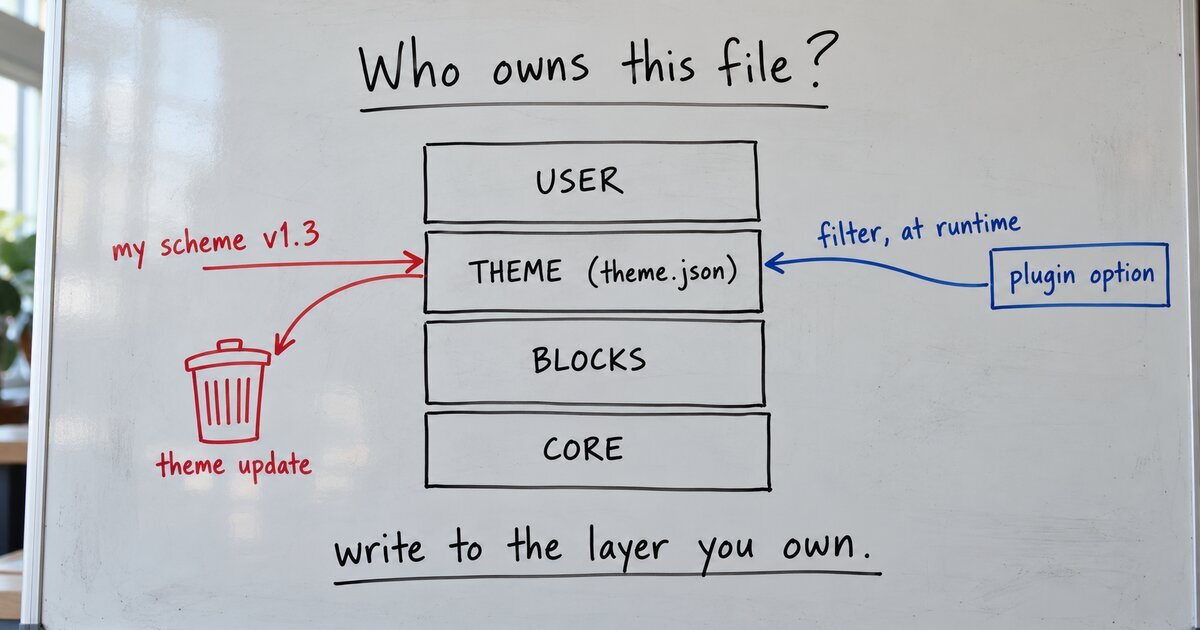
I redeployed the theme to my staging site, and the site turned blue. It had been gold that morning. Nothing in the deploy touched color. My coding assistant re-applied the gold scheme, added “deploy first, re-apply colors last” to the deploy runbook, and moved on. That runbook line was a bug report filed as a chore. My rule that every claim gets checked against the code before it’s published caught it, while I was planning this post: the plan said a site’s whole design is stored in the theme’s theme.json file.
Where the colors were
The color tool in my plugin, Blockwright Blocks, takes a brand color and generates a full, contrast-checked palette. Version 1.3.0 saved that palette by rewriting the theme.json file of the active theme.
To see why that’s a problem, you need the four layers WordPress builds a site’s design from. Each one overrides the ones below it, as core’s resolver code merges them:
- User: the site owner’s own changes in the Site Editor, saved as a
wp_global_stylesrecord in the database. - Theme: the theme’s
theme.jsonfile, written by the theme author and shipped with every version. - Blocks: the defaults in each block’s
block.json. - Core: WordPress’s own defaults.
The tool wrote into layer 2, the theme author’s layer. I’m the theme author, so the file looks like mine to change. It isn’t, once the theme is installed on someone else’s site from WordPress.org.
What a theme update does
A theme update doesn’t patch files. It deletes the old theme folder and installs the new one. In wp-admin/includes/class-theme-upgrader.php (WP 7.1.3), both the single update and the bulk and automatic update paths pass this to the installer:
'clear_destination' => true,So theme.json goes, and the shipped one replaces it. Every scheme the tool had applied went with it. My staging deploy used wp theme install --force, which runs the same upgrader, and that is the whole story of the blue site.
The AI had copied that write method from Create Block Theme, the plugin WordPress itself publishes for building themes in the Site Editor. It’s the right method there. Its users are authoring their own theme, so the edited file is their product. My users are site owners running a theme they didn’t write, which WordPress.org updates for them. The AI never asked whose file it was.
The honest scope: no theme release shipped after the color tool did, so no one outside my staging site lost a scheme. The next theme release would have reset all of them.
Three fixes I didn’t use
- Re-apply after every update. Hook the upgrader and write the scheme back. That keeps editing the theme author’s file, and it has to guess why the file changed when someone edits it by FTP or git.
- Copy the palette into the user’s Global Styles. This is what WordPress does when you pick a style variation. The copy freezes: later theme fixes never reach that site. Core’s own maintainers track this as a problem in gutenberg#62661, open since June 2024.
- Write into a child theme. This is the standard answer to “how do I update a theme without losing my customizations.” But a child theme’s palette replaces the parent’s whole palette array instead of merging with it, so any color a parent update adds never arrives.
The fix: keep it out of the theme’s files
Version 1.4.0, released last week, stores the applied palette in the plugin’s own option and hands it to WordPress on each request, through a filter core has had since 6.1: wp_theme_json_data_theme. WordPress’s developer blog describes this filter as a way to override a theme’s settings from a plugin instead of a child theme. The real code is short:
add_filter( 'wp_theme_json_data_theme', __NAMESPACE__ . '\\supply_applied_design' );

function supply_applied_design( $theme_json ) {
	$applied = Write_Engine::applied();
	// Swap the applied colors into the theme's palette, matched by slug (omitted here).
	return $theme_json->update_with( $patch );
}
Two details carry the weight. The colors are swapped in by slug, so a color the theme ships that my scheme doesn’t set keeps its shipped value, and a fix in a theme update still arrives. And if the theme’s data isn’t in the shape the code expects, it returns the data untouched.
The result: theme.json on disk stays byte-for-byte what the theme author shipped. The user layer still sits on top, so Site Editor changes still win. A theme update replaces the folder, and the scheme is still there on the next page load, because it was never in the folder. Sites on 1.3.x moved over automatically when they updated to 1.4.0.
Conclusion
A site’s own settings never go in the theme’s theme.json, because a theme update replaces that file. Store them in a plugin option and supply them through wp_theme_json_data_theme.