
The Design tool is the part of Blockwright Blocks I most wanted to build, and I never announced it. It first shipped in 1.3.0 in September. Version 1.4.0, live on WordPress.org since 2026-10-16, is the version I’d point anyone to, so this is the announcement.
What it does
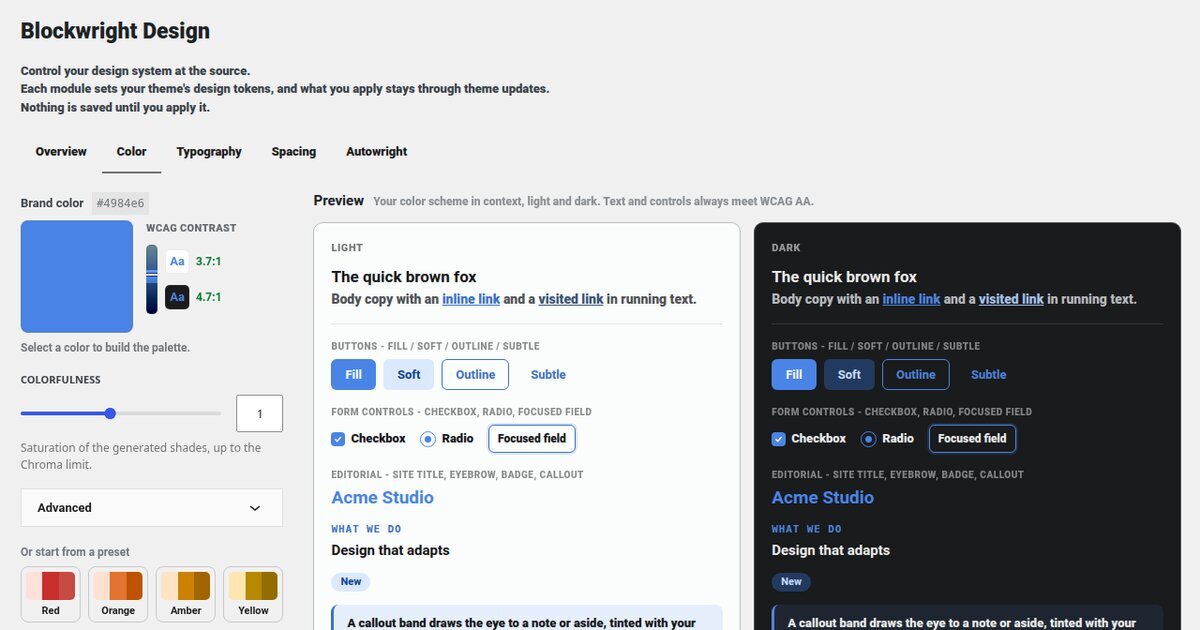
Open Appearance, then Design, then Color:
- Pick your brand color, or start from one of sixteen presets: fourteen hues plus two neutrals, Grayscale and Slate.
- It generates the whole scheme from that one color: a tonal ramp for the brand, links and their states, button fills, neutrals, borders, surfaces and text. The brand color itself stays exactly the color you entered.
- Every text and control color meets WCAG AA contrast, in light mode and in dark.
- The preview shows the scheme on real UI, light and dark side by side: buttons, form fields, headings, a callout. Nothing is saved until you apply it.
- One click applies it. The site then follows each visitor’s own light or dark setting from that single scheme, with no toggle needed.
- Every apply saves a restore point, so you can roll back.
The Colorfulness slider, and the Chroma limit under Advanced, set how saturated the generated shades are.
What’s new in 1.4.0
- Your scheme stays through theme updates. Version 1.3.x saved the scheme inside the theme’s own files, which a theme update replaces. No theme update shipped while 1.3.x was current, so no one lost a scheme. 1.4.0 keeps the scheme in the plugin, and schemes already applied moved over automatically.
- It works on hosts that block theme file writes, because it no longer writes theme files.
- “Copy to site styles” on the Overview saves your colors into your site’s own styles, so they stay if you deactivate the plugin.
- Colorfulness and Chroma limit reopen where you left them.
- Deleting the plugin removes the data it saved. Deactivating it removes nothing.
What it needs
The Design tool is built for the free Blockwright theme, which I wrote up last week. On another theme the screen says so and links to it. The plugin’s blocks (Icon Box, Icon List, Stat Counter, Timeline, Stamp, dynamic content, 298 icons and a light/dark toggle) work on other block themes too.
Limits
- Color is the only module so far. Typography and spacing are next, on the same screen.
- The look depends on the plugin being active, unless you use “Copy to site styles”.
- I haven’t tested 1.4.0 on a host with a persistent object cache, such as Redis or Memcached. If you run one and the colors look wrong after updating, open a support thread and I’ll look at it.