
Here is how WordPress describes one of the more useful things it can now do. The Block Bindings API lets you “bind dynamic data to the block’s attributes.” Every word of that is true, and unless you already build plugins, not one of them tells you what you would use it for.
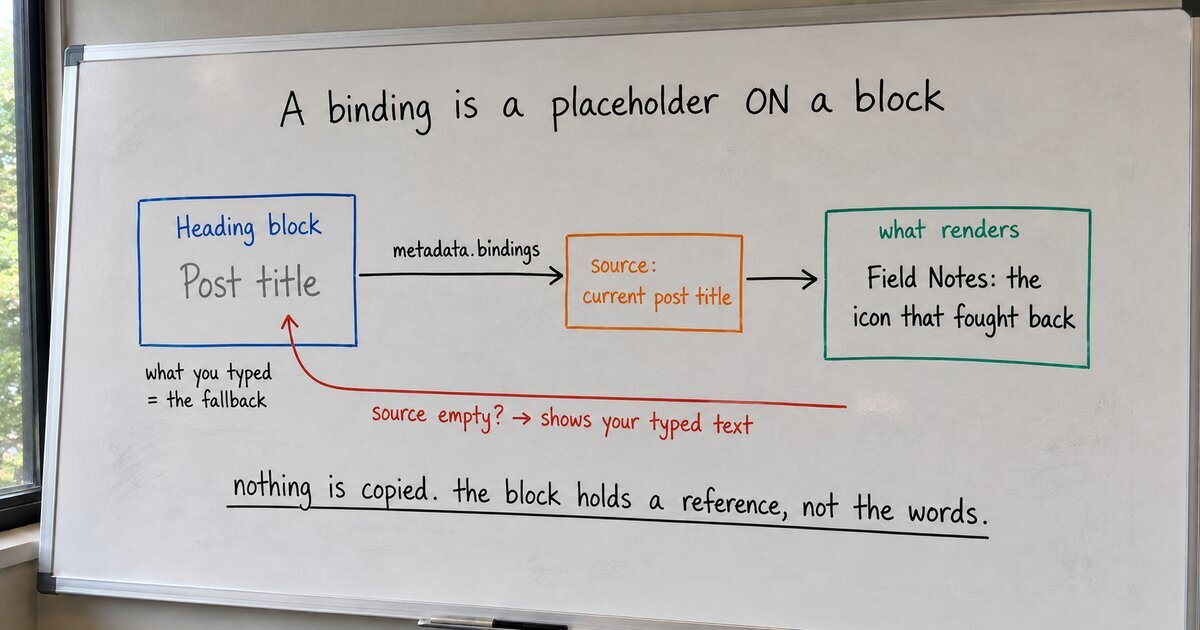
So here it is in a sentence. A block binding is a placeholder on a block: at render time the block shows data pulled from a named source, and the text you typed stays put as the fallback, shown whenever that source has nothing to give.
That is the whole idea. The rest is detail, and the detail is short.
Take a Heading block and type “Post title” into it. Then connect its text to a source, the current post’s title. On the front end the heading no longer reads “Post title”; it reads whatever the post is actually called. Nothing was copied. The heading holds a reference, not the words, so when you rename the post the heading follows. This is the part the tutorials get breathless about, and it is genuinely the good part: one edit at the source, every bound block updates.
Now the part they skip. What renders if the source comes up empty? I went and read core, because the official docs show a fallback in an example and never say how it works. In WordPress 7.1, the binding is resolved in class-wp-block.php, and the rule is exactly one line:
// The source's value replaces your typed content ONLY when it returned something.
if ( ! is_null( $source_value ) ) {
    $computed_attributes[ $attribute_name ] = $source_value;
}
If the source returns nothing, the block keeps its stored content and renders that. So the “Post title” you typed was never a placeholder you had to remember to delete. It is the fallback. Put something real there, and a page that loses its data source degrades to a sensible default instead of a blank.
Bindings do not work on every block, and the list is shorter than you would guess. Core allows four: paragraph and heading (their text), image (its source, alt text, caption, and a couple more), and button (its link and label). Four blocks, a fixed set of attributes each. That is the whole surface today.
One thing snags everyone here, and it is vocabulary, not concept. Three words get used as if they were interchangeable, and they are not:
- A block is one thing on the page: this heading, that image.
- A pattern is a saved arrangement of blocks you drop in as a unit.
- A template is the frame a whole kind of page is poured into.
A binding lives on the block, and that is the one thing to hold onto. Picture blocks as nesting dolls: a block sits inside a pattern, the pattern inside a template, the template inside the page. The binding belongs to the innermost doll, the block itself, so it rides along however deep the nesting goes. Connect the block, then, never the pattern or template around it. Do that and the placeholder travels with it: into a pattern, into a template, onto a page.
What WordPress puts in front of you in the editor is aimed squarely at custom fields, which is the one source every introduction demonstrates. That is reasonable, and it is narrow. The everyday things you would actually want a placeholder for, a post’s title or excerpt or author, its featured image, the site’s own name, are each a source someone has to add. So we added them, with a small visible picker to choose from, in our free Blockwright Blocks plugin. It writes nothing but core markup, so switch it off and every block quietly renders its typed content again. Which, by now, you know the proper name for.