
I needed a related-posts section, and I already had a grid I liked. Our theme ships an archive-feature-grid pattern, three posts across, and I had screenshotted it for the docs. So I did the sensible thing and started the new pattern by copying it. Canonical source, proven code, five minutes of work.
The new pattern rendered as a single stacked column. Not three across. One.
My first assumption was that I had fumbled the copy. So I put them side by side and rendered the original archive-feature-grid too, the one in the docs screenshot, the proven one. It stacked as well. It had been stacking the whole time it shipped. The screenshot looked like a grid because the demo happened to be three short posts that filled the row, but the block was never a grid. It was a single column that had never been handed more than it could show.
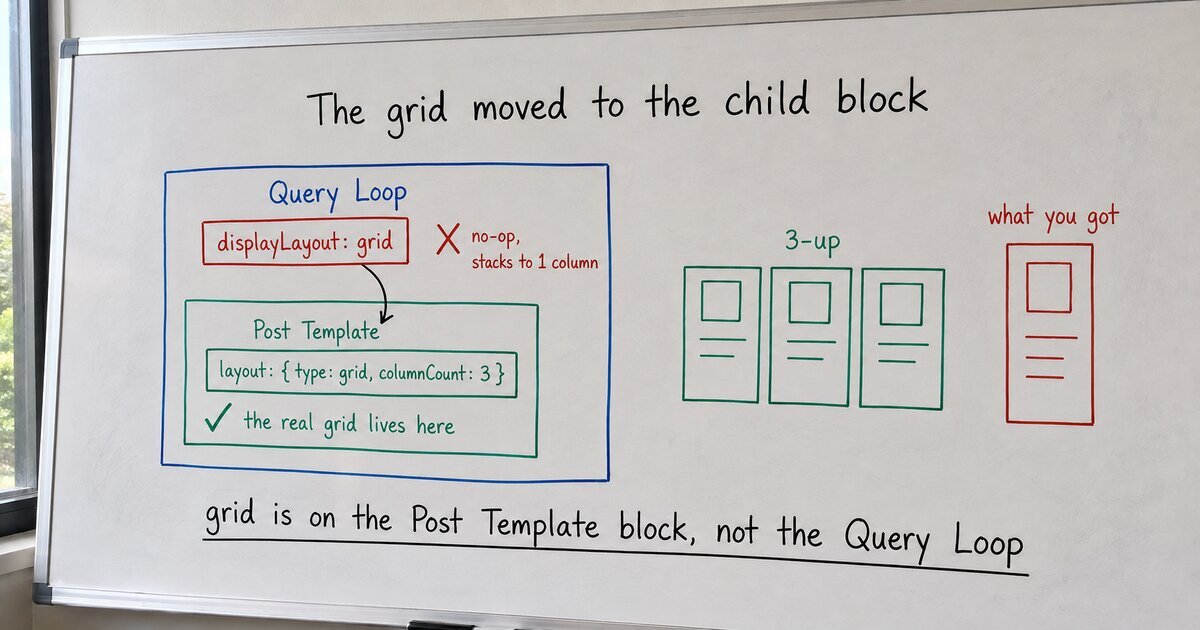
Here is the mechanism, read from WordPress 7.1. The markup set displayLayout on the Query Loop to {"type":"grid","columns":3}. That reads exactly like an instruction to build a grid. It is not one. In wp-includes/blocks/post-template.php, the only branch that looks at displayLayout checks for a single value:
if ( isset( $block->context['displayLayout']['type'] )
     && 'flex' === $block->context['displayLayout']['type'] ) {
    $classnames = "is-flex-container columns-{$block->context['displayLayout']['columns']}";
}flex, and nothing else. There is no grid case here. A displayLayout.type of grid matches no branch, adds no class, and falls through to the default, which is a plain stacked list. No error, no warning, no deprecation notice. The block is valid. It simply does not do the thing its own attribute appears to name. That value is a no-op, the programmer’s word for a setting that parses cleanly and then does nothing at all.
The grid moved. A few lines down, core reads a completely different attribute, the Post Template block’s own layout:
if ( isset( $attributes['layout']['type'] )
     && 'grid' === $attributes['layout']['type']
     && ! empty( $attributes['layout']['columnCount'] ) ) {
    $classnames .= ' ' . sanitize_title( 'columns-' . $attributes['layout']['columnCount'] );
}
So the live grid is <!-- wp:post-template {"layout":{"type":"grid","columnCount":3}} -->, set on the child block, not displayLayout on the parent. This is not obscure trivia. It is one of the most common Query Loop questions in the support forums, usually phrased as “my Query Loop stopped showing columns,” because the control migrated from the Query Loop to its Post Template child and a lot of saved markup still points at the old place.
The fix was one attribute moved to the right block. Delete the displayLayout grid from the query, and put layout with columnCount on the Post Template. The markup is barely longer. It just addresses the block that is actually listening.
The durable lesson is about two tests that markup has to pass, and how easily the first one hides the second. “Valid” and “does what I meant” are not the same check. The block validator only asks the first: is this well-formed markup a block can parse? Our no-op grid passed it every single time, because a Query Loop carrying a meaningless displayLayout value is still a perfectly valid Query Loop. Only the second check catches the gap, and the second check is a render with enough real posts to prove there is more than one column. We never ran it on the original, because three short demo posts look fine stacked, and a fine-looking screenshot is where most QA quietly stops.
The part I keep relearning: copying your own shipped code copies your own shipped bugs, and the more canonical the source feels, the less likely you are to look. The related-posts pattern did not inherit a grid. It inherited the absence of one.