
I was building a client site on my own block theme and wanted to switch the header from the simple layout to the centered one. The theme shipped both. The Site Editor offered no way to swap them. I selected the header, checked the toolbar: part name, drag, move, Edit original, Options. I checked the transform menu: “No transforms.” The only route I found was destructive: edit the part, select everything, delete it, and insert the other layout from the pattern inserter by hand.
I filed it as a theme bug and moved on. When I came back to fix it properly, I read the editor’s source instead of poking at menus, and the whole thing came apart in about twenty lines.
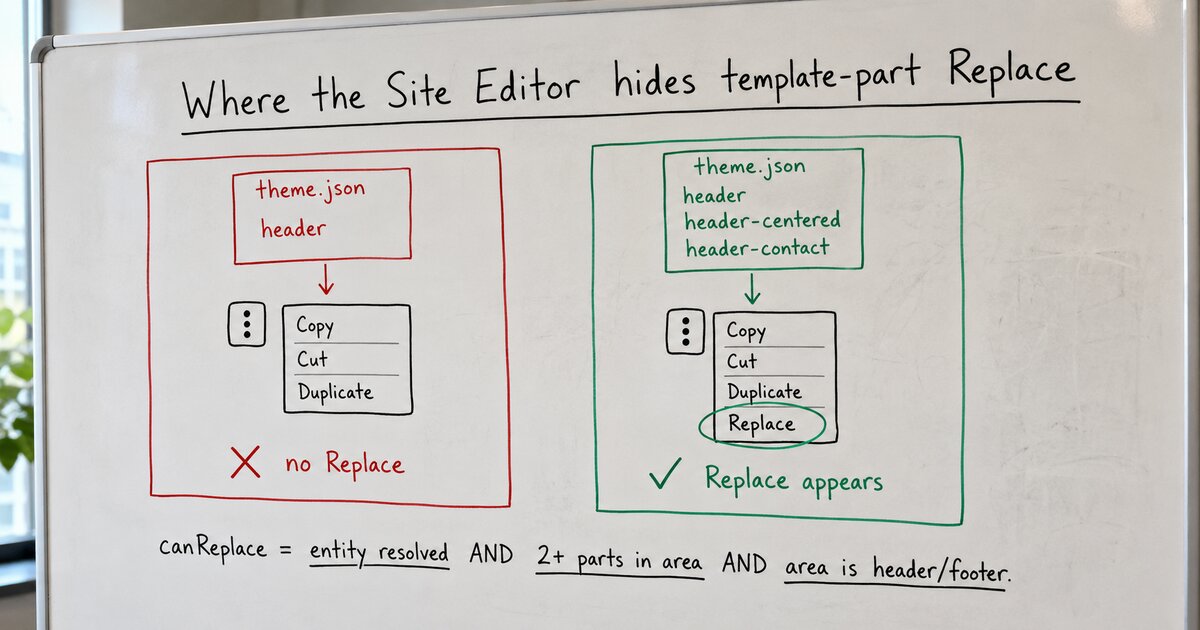
WordPress does have a one-click swap. It is a menu item called Replace, and it lives in the template-part block’s Options menu, the kebab at the end of the block toolbar, next to Copy, Cut, and Duplicate. Not in the main toolbar row, not in the transform menu, not in the inspector. It is also conditional, so when its conditions fail it doesn’t render at all. There’s no disabled state and no hint. You can’t tell the difference between “this doesn’t exist” and “you haven’t met the requirements.”
The conditions are in the template-part block’s edit component, in packages/block-library. I’m reading the copy that ships in WordPress 7.0.2:
const SUPPORTED_AREAS = [ 'header', 'footer', 'navigation-overlay' ];

const hasReplacements = !! templateParts.length;
const canReplace =
	isEntityAvailable &&
	hasReplacements &&
	SUPPORTED_AREAS.includes( area );
if ( ! canReplace ) {
	return null;
}
Three gates. The part’s entity has to be resolved, the area has to be header, footer, or navigation-overlay, and templateParts has to be non-empty. That last one is the interesting one. It comes from a hook that fetches every wp_template_part on the site and filters it down:
return templateParts.filter(
	( templatePart ) =>
		createTemplatePartId( templatePart.theme, templatePart.slug ) !==
			excludedId &&
		( ! area ||
			'uncategorized' === area ||
			templatePart.area === area )
);
Same area, excluding the part you’re looking at. So the whole feature reduces to a theme-packaging rule: Replace exists only when the theme registers at least two template parts in the same area. One header part means zero alternatives, means the menu item silently never renders.
That was my actual bug. The theme shipped the alternate layouts as patterns, tagged core/template-part/header so they’d show up in the inserter. Patterns don’t count. The filter above reads registered template parts, the templateParts array in theme.json plus a file per part in parts/. Once I registered the alternates as real parts, each one a one-line wrapper around its pattern:
Replace appeared in the kebab menu, opened a “Choose a header” dialog listing exactly the alternates, and swapped the part in one click. Both areas, verified end to end. This is the packaging the community calls template part variations: several parts registered to one area, each a different take on the same slot.
The patterns aren’t wasted, though. The same edit component has a second path that feeds same-area patterns into a “Design” panel in the inspector’s Settings tab, so tagging your layouts core/template-part/header still buys you something. But it’s the registered parts that unlock the swap.
Not a bug to file, just a contract nobody states. The Theme Handbook’s template-parts page documents the registration keys and says assigning areas creates “a nicer user experience in the Site Editor,” and that’s the whole disclosure: nothing about Replace, nothing about needing more than one part, nothing about which areas qualify. The swap UI is driven entirely by what your theme registers, and it fails silent. If your Replace is missing, check the three gates in order. Exactly one block selected, a supported area, and two or more parts registered for it. It’s almost always the parts.