
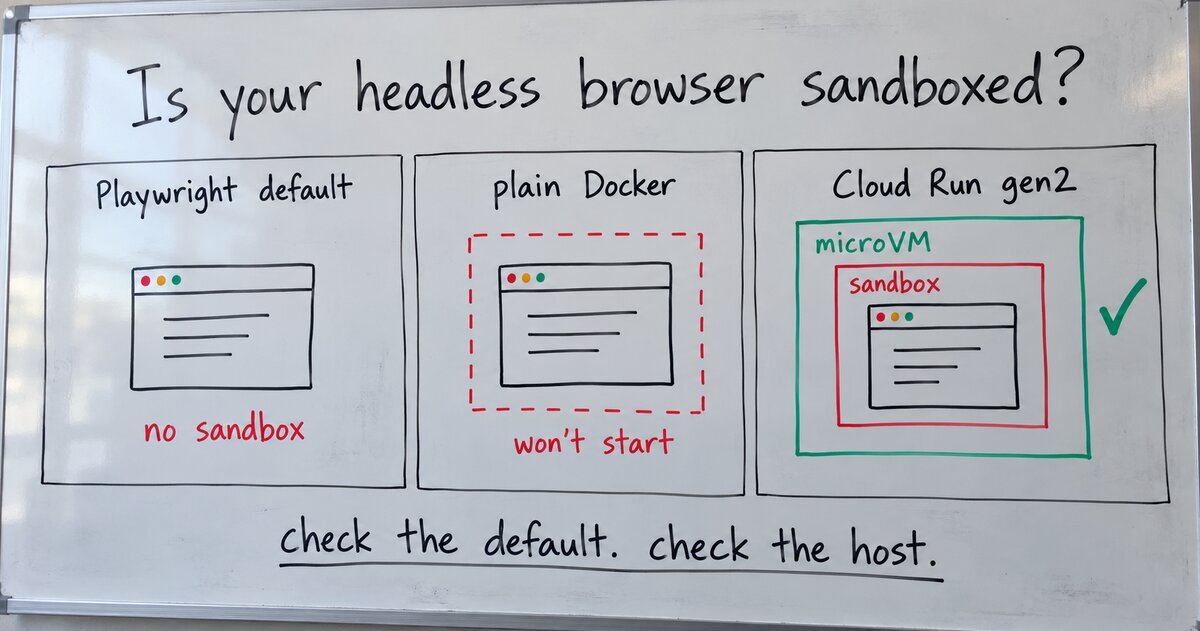
My website auditor opens other people’s sites in a real Chromium browser, driven by Playwright. It needs a real browser to measure the mobile layout, Core Web Vitals and accessibility, and to test forms. Any of those pages could be hostile, so how the browser runs is a security decision first.
The wall that matters
Chromium’s sandbox exists, in the words of its design document, to “provide hard guarantees about what ultimately a piece of code can or cannot do no matter what its inputs are.” A page that exploits a bug in the renderer still lands inside the sandbox, without the access it needs to change the machine or read its secrets.
Playwright doesn’t turn it on for you. Its launch() option for the sandbox, chromium_sandbox in Python and chromiumSandbox in JavaScript, is documented as “Enable Chromium sandboxing. Defaults to false“, in Playwright’s API reference. A plain chromium.launch() runs every page you open without Chromium’s own wall.
So every browser my auditor starts goes through one shared function that asks for the sandbox:
def browser_launch_kwargs(extra_args: tuple[str, ...] = ()) -> dict:
    kwargs = {
        "headless": True,
        "chromium_sandbox": chromium_sandbox_enabled(),
        "args": [*_HARDENING_ARGS, *extra_args],
    }
chromium_sandbox_enabled() returns true unless an environment variable says otherwise. The hardening arguments turn off extensions, sync, background networking and default apps, and the page-capture browser refuses downloads.
Why it breaks in a container
On Linux, the sandbox needs to create user namespaces, and Docker’s default system-call rules don’t allow it. Puppeteer’s troubleshooting page says Chrome crashes with “No usable sandbox!” when it can’t set one up. Playwright’s Docker guide ships a custom seccomp profile for exactly this case: Docker’s default system-call rules, plus permission to create user namespaces.
That is what happened the first time the auditor ran in a container: Chromium couldn’t start its sandbox, so none of the browser checks ran. The report marks a check that couldn’t run as “Not tested”, so a broken browser can’t pass for a clean site.
Four ways out
- Give the sandbox what it needs. Run the browser as a non-root user and attach Playwright’s seccomp profile with
--security-opt seccomp=seccomp_profile.json. Playwright recommends this for untrusted websites. You keep Chromium’s own wall, and the container grants only the extra system calls the sandbox uses. - Add the
SYS_ADMINcapability. Both guides suggest--cap-add=SYS_ADMINwhen Chromium fails with odd errors, and Playwright scopes it to “when developing locally”. The Linux capabilities man page calls that capability “overloaded”, and its notes call it “the new root”. That is too much power to give a server that opens strangers’ pages. - Run on a host that provides namespaces. Google Cloud Run’s second-generation environment is a microVM with “full Linux compatibility, including support for all system calls, namespaces, and cgroups”, in the words of its execution environments page. The first generation is a gVisor sandbox instead.
- Turn the sandbox off and build other walls. Puppeteer calls running without a sandbox “strongly discouraged”, and Playwright treats it as acceptable for trusted content. If you take this route, the other walls have to carry the weight.
What I run
The auditor runs on Cloud Run’s second generation, option 3. Before switching, I deployed a test revision with the sandbox turned on, sent it no live traffic, and ran real scans against it. Chromium started its sandbox, and Core Web Vitals and the accessibility checks came back with no sandbox errors in the logs.
So a hostile page has to get through four walls:
- Chromium’s sandbox. A page that exploits a renderer bug still lands without the access to change the machine or read its secrets.
- Host isolation. The container itself runs inside Cloud Run’s microVM.
- A non-root user. The container runs as an unprivileged account, so an escape doesn’t start with root inside the container either.
- Egress filtering. The tool’s own requests go through an SSRF guard that refuses private and internal addresses. The browser’s traffic goes through Stripe’s Smokescreen proxy, which does the same at the network level, so a hostile page can’t use my server to reach the network behind it.
The browser is also stripped down: no extensions and no background networking, and the page-capture browser refuses downloads.
The Docker image still defaults the sandbox to off, with a comment above the setting that says why: on a plain Docker host it can’t start, and the tool should still run there. The Cloud Run deploy file turns it back on. So the image runs anywhere, and the deployed service runs with every wall.
Conclusion
If your tool opens pages you don’t control, pass chromium_sandbox=True (chromiumSandbox: true in JavaScript) to Playwright’s launch(), because the sandbox is off by default.