
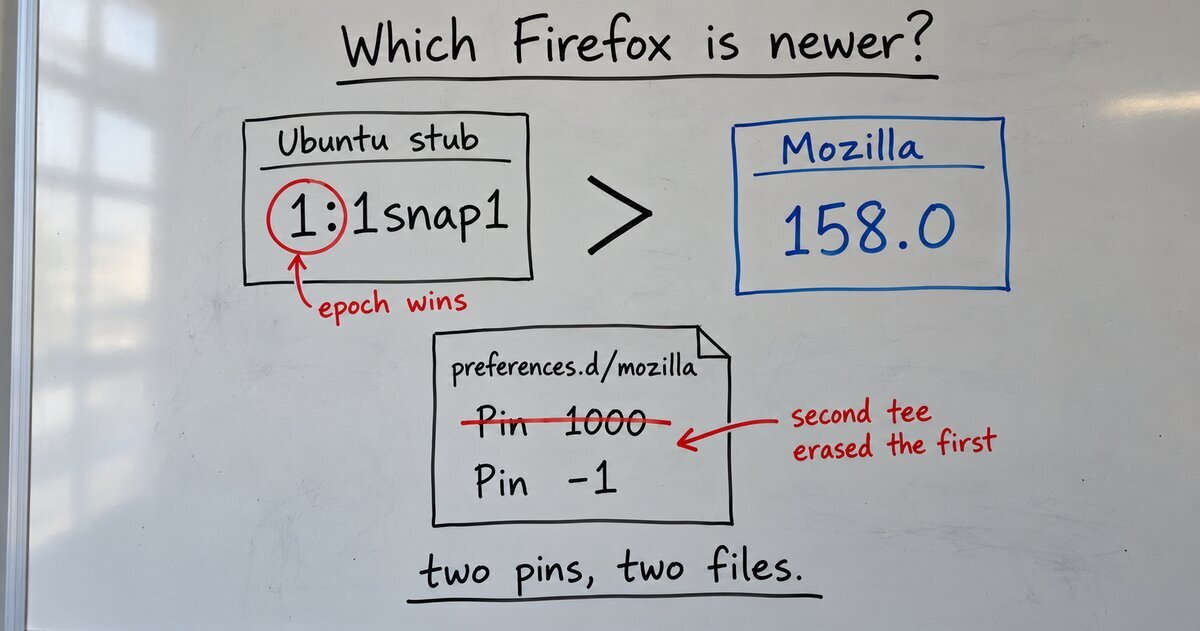
When I built f-snap, my tool that swaps Ubuntu 26.04’s app snaps for their makers’ own packages, Firefox was the first package apt refused. Ask apt for Mozilla’s Firefox and it keeps Ubuntu’s instead. Two things stand between Ubuntu and Mozilla’s Firefox: a version number apt compares, and a file that Mozilla’s own instructions overwrite.
The version number: an epoch
Ubuntu’s firefox package isn’t Firefox. Its own description says it “Installs Firefox snap and provides some system integration”, according to Ubuntu’s package page. Its version on 26.04 is 1:1snap1-0ubuntu9.1. Mozilla’s Firefox in Mozilla’s APT repository is 158.0~build2.
The 1: at the front is an epoch. A Debian version is epoch:upstream-revision, and apt compares the epoch first. A version with no epoch has epoch 0. The epoch exists “to allow mistakes in the version numbers of older versions of a package”, the deb-version manual says. So 1: followed by anything sorts above 158.0, and to apt, Mozilla’s newest Firefox is a downgrade from Ubuntu’s stub.
apt has two separate gates for a downgrade:
- A pin of 1000 or more. apt’s rule is “Never downgrade unless the priority of an available version is at least 1000”, per the apt_preferences manual.
--allow-downgradeswhen you pass-y. At a terminal, apt asks before downgrading. In a script,apt-get install -ystops withE: Packages were downgraded and -y was used without --allow-downgrades.The apt-get manual calls the flag “a dangerous option”.
f-snap does both, and it proves every install with a simulation before it removes any snap, so a refused install never leaves you without a browser.
The file: Mozilla’s pin that erases itself
Mozilla’s own instructions handle the epoch with a 1000 pin, and then, for Ubuntu users, a second pin that blocks Ubuntu’s stub. Both steps write the same file, Mozilla’s install page shows (updated 16 August 2026):
sudo tee /etc/apt/preferences.d/mozilla > /dev/null << EOF
Package: *
Pin: origin packages.mozilla.org
Pin-Priority: 1000
EOF

sudo tee /etc/apt/preferences.d/mozilla > /dev/null << EOF
Package: firefox
Pin: release o=Ubuntu
Pin-Priority: -1
EOF
tee without -a replaces the file. The -a flag means “append to the given FILEs, do not overwrite”, the tee manual says. So the second command deletes the 1000 pin the first one wrote. Mozilla’s Ubuntu steps don’t work as written on 26.04. The Ubuntu step went live on 13 August 2026, the page’s revision history shows. I reported it to Mozilla on 17 October 2026, with the container output below.
I ran Mozilla’s steps exactly as written in a clean Ubuntu 26.04 container, with the stub installed as it is on a fresh desktop. Afterward the file held only the -1 pin. Mozilla’s 158.0~build2 sat at the default priority of 500, below the 1000 a downgrade needs, and apt answered firefox is already the newest version (1:1snap1-0ubuntu9.1). It kept the stub. Without the snap, the stub’s own /usr/bin/firefox only prints “requires the firefox snap to be installed”. Mozilla’s page tells Ubuntu users to set the pin before running snap remove firefox, so following it in order leaves no working Firefox.
The fix: two pins, two files
Put each pin in its own file:
sudo tee /etc/apt/preferences.d/mozilla > /dev/null << EOF
Package: *
Pin: origin packages.mozilla.org
Pin-Priority: 1000
EOF

sudo tee /etc/apt/preferences.d/ubuntu-firefox-stub > /dev/null << EOF
Package: firefox
Pin: release o=Ubuntu
Pin-Priority: -1
EOF

sudo apt-get update
apt-cache policy firefox    # Candidate should be Mozilla's version, at 1000
sudo apt-get install firefox    # in a script: -y --allow-downgrades
In the same container, with both pins in place, the candidate became 158.0~build2 at priority 1000. apt-get install -y firefox stopped at the downgrade error, and apt-get install -y --allow-downgrades firefox installed Mozilla’s Firefox. Using tee -a for the second step works too; separate files are easier to read later.
When apt insists the newest version is the one you’re trying to replace, read the whole version string, not the number you expected. apt-cache policy shows the epoch and the priority of every candidate, and it shows in one screen why apt keeps Ubuntu’s package.